
I’ve gotten my hands on a lot of Active Directory management tools over the years. First as an admin at various companies, and later while building au2mator, because I wanted to fix exactly the gaps that used to annoy me back when I was the one on call. If you’re googling “Active Directory management tool” right now, chances are you’ll land on the same three or four names every time: ManageEngine ADManager Plus, Adaxes, One Identity Manager. And I’ll say this upfront: none of them are bad. I’ve worked with all three, or at least tested them thoroughly. But they don’t actually solve the same problem, and before you commit to one, it’s worth taking a closer look at what problem you’re really trying to solve.
The real problem is rarely “managing AD”
Almost nobody is genuinely searching for a tool to manage Active Directory in some abstract sense. The native Microsoft tools, ADUC, PowerShell, the Microsoft Entra admin center, already handle that reasonably well. What actually pushes people toward these third-party tools is almost always one of a handful of very specific problems.
The helpdesk needs to reset passwords without getting handed domain admin rights along the way. Onboarding and offboarding drags on forever because it all depends on one specific person who happens to be on vacation this week. There’s no clean audit trail showing who changed which group and when, which turns into a real problem the moment an ISO audit or a security review shows up. And more and more often, business departments want self-service themselves, like a team lead who wants to add a new hire to the right distribution list without filing a ticket and waiting three days for IT to get to it.
That’s the actual core behind most of these searches. “Active Directory management tool” is, in most cases, really just “delegation without the risk” wearing a different search term. If you ask yourself that question first, picking the right tool gets a lot easier, because you stop sorting by feature count and start sorting by how well a tool solves that one specific problem.
The usual suspects, in detail
ManageEngine ADManager Plus is a solid, very broadly built tool. The feature list is genuinely impressive: reporting, provisioning, compliance templates, it’s all in there somewhere. The price for that breadth is a correspondingly complex setup. If your IT department is big enough to actually invest the time into a full configuration, you get a very capable tool out of it. Licensing historically scaled per domain controller, which can get unnecessarily expensive for smaller environments running several DCs, so it’s worth running the numbers before committing.
Adaxes is technically impressive. The automation engine, with its business rules and custom commands, lets you build workflows of almost arbitrary complexity. The catch is the learning curve. If you’re hoping your junior helpdesk hire will be productive with it in an hour, that’s not going to happen, and that’s simply not who Adaxes is built for. It’s more of a tool for the AD architect in your organization who wants to build genuinely complex workflows and has the time to get deep into it. For quickly delegating standard tasks, it’s honestly overkill.
One Identity Manager plays in a completely different league, the classic enterprise Identity Governance and Administration category, IGA for short. It’s powerful, covers governance and compliance at a corporate scale, but comes with a price tag and an implementation project to match, usually stretching over several months. For a company with 100 or 200 employees, that’s almost always massive overkill, both in budget and in ongoing operational effort.
What all three have in common is their origin story: they were built primarily for on-premises Active Directory, and Azure AD or Entra ID got bolted on as an afterthought somewhere along the way, rather than being treated as an equal part of the architecture from day one. You feel that in daily use the moment you try to model a genuinely hybrid scenario.

Where I saw an actual gap
The point where I started building something myself came from exactly that hybrid reality. Most mid-sized companies I’ve dealt with over the past few years are hybrid today, whether they planned it that way or not. On-prem AD is usually still running, often for historical reasons or because of some legacy application nobody wants to touch, but Entra ID or Azure AD has long since become the actual identity hub for the business, and Azure Automation is quietly taking over more and more of the real automation work behind the scenes. The classic AD tools come from an era when Active Directory meant on-premises, full stop, and you can still feel that baked into their interfaces and their architecture today.
That’s why I built au2mator from day one to treat both worlds as first-class citizens. On-prem AD connects through a local agent, Azure Automation and Entra ID are integrated directly with no detour. The real difference compared to ManageEngine or Adaxes isn’t really about raw feature count, it’s about who the tool is actually built for. I wanted a helpdesk employee with zero PowerShell knowledge to understand how to kick off an approved process within five minutes, and I wanted the IT team, on the other side, to be able to build a new self-service workflow in ten minutes, without needing a multi-day training course to get there.
What the architecture actually looks like
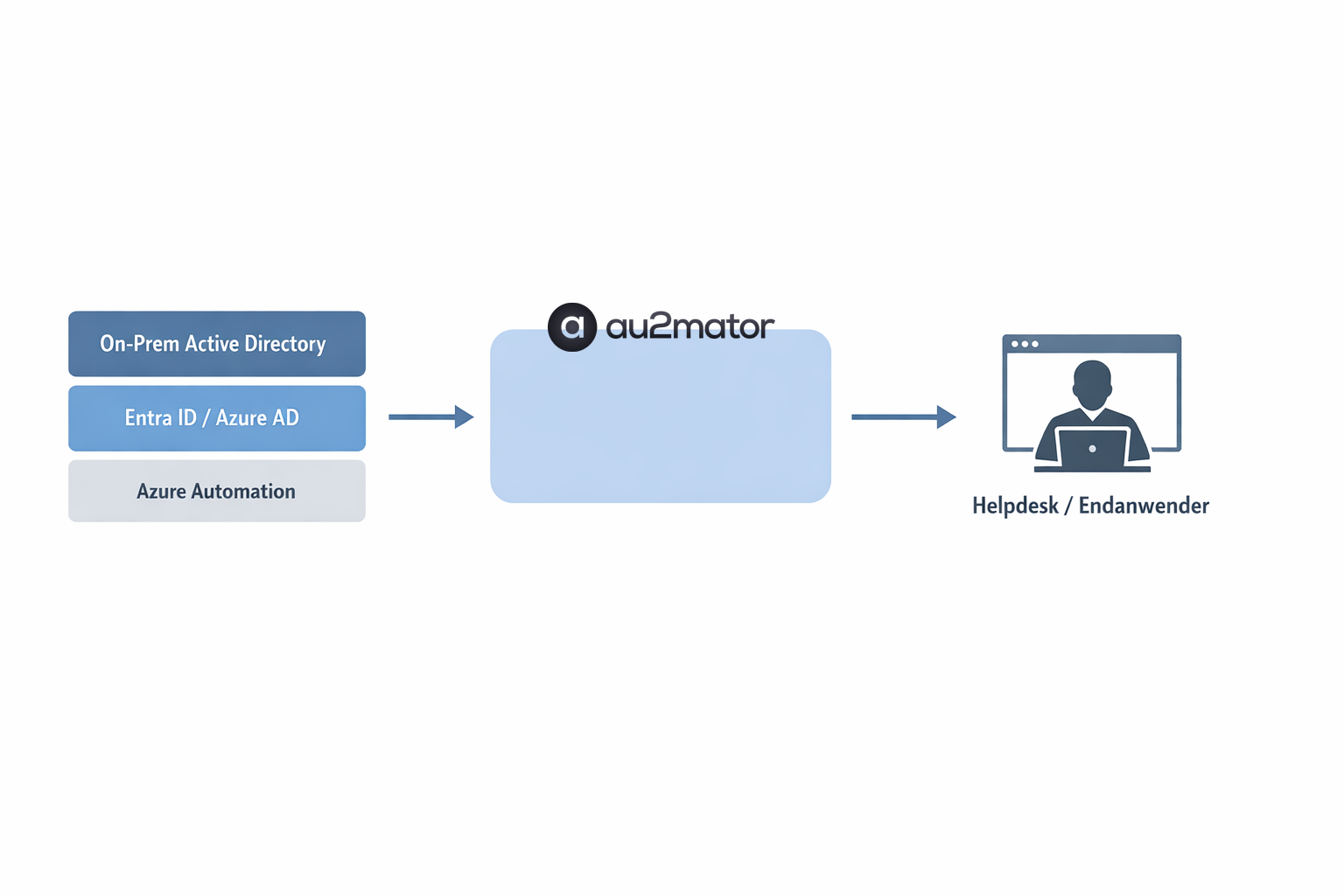
Visually, it comes down to something fairly simple. On one side sits your existing identity backend: on-prem Active Directory and Entra ID side by side, plus Azure Automation handling the actual execution logic. On the other side is the person who needs to get something done, a helpdesk agent or a manager, for example. In between sits au2mator as the mediation layer. It knows the permissions, it knows which processes are approved, and it runs, using its own service account, exactly what’s been authorized. Nothing more, nothing less.
A quick side-by-side
To make this a bit more concrete, here’s how the four tools stack up against each other, with their core strength and who I’d actually recommend each one to, based on real experience.
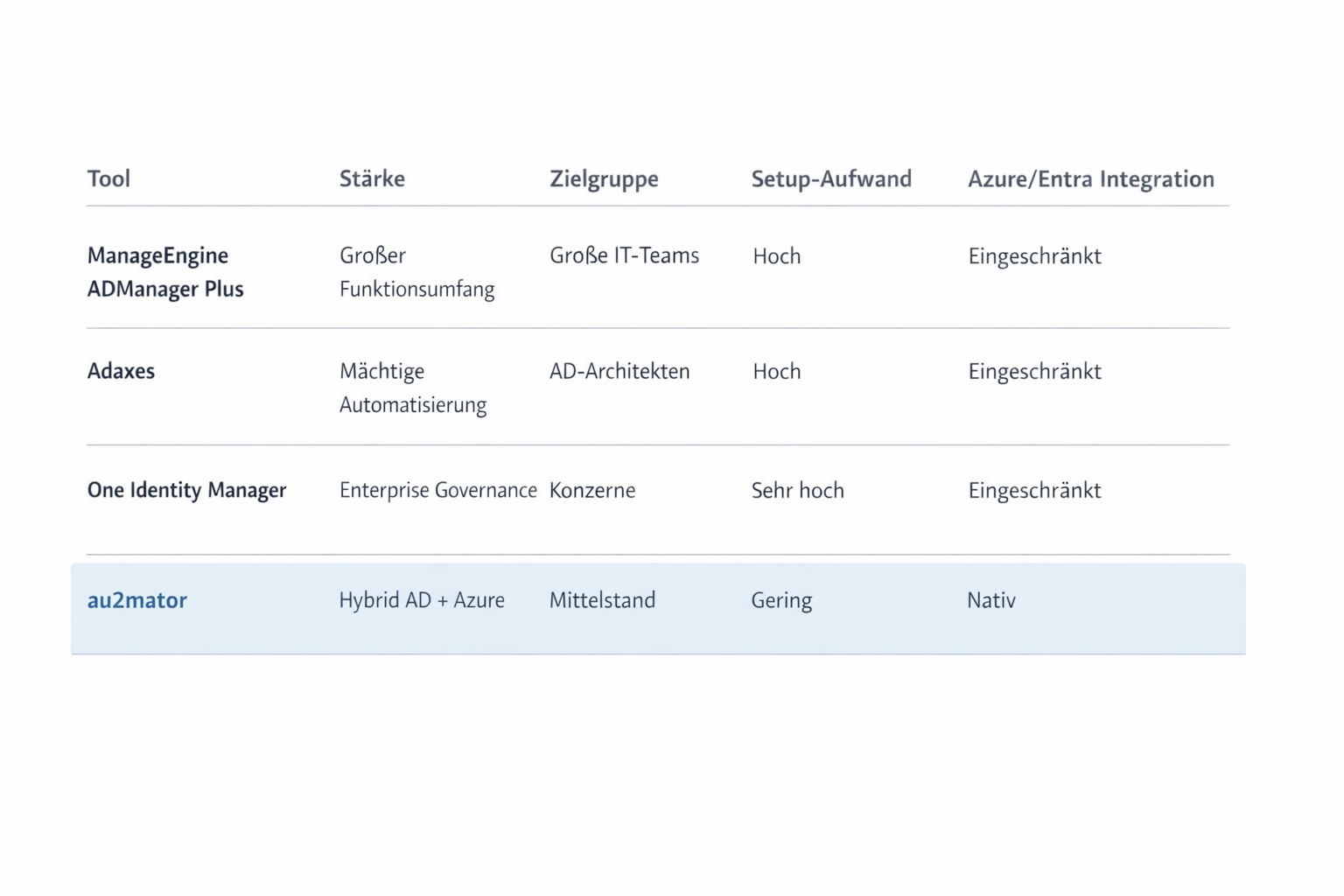
ManageEngine wins on sheer feature breadth and detailed reporting, but it’s really built for larger IT teams that can afford to invest the time in a full configuration. Adaxes has the most powerful automation engine of the three classic tools, which also means it’s aimed squarely at AD architects with complex, highly customized workflow requirements. One Identity Manager is the right call if enterprise governance and comprehensive compliance requirements are the priority, and you’ve got an implementation project budgeted in. And au2mator is deliberately built around the hybrid reality of on-prem AD and Azure Automation together, with an intentionally simple self-service interface for teams that want to get started fast without a big project behind it.
What I’d actually recommend
If you’re planning an AD governance project with serious enterprise-scale compliance requirements, I’d honestly point you toward One Identity, that’s exactly the category it was built for. If you need deeply customized, complex automation rules and you have the time to build and maintain them yourself, Adaxes is a genuinely good choice. And if you’ve got a larger IT department that’s after the broadest possible all-in-one tool anyway, ManageEngine ADManager Plus is a solid option.
But if you’re like most of the mid-sized companies I talk to, and what you actually want is for your helpdesk to be able to start handling password resets and basic group management themselves, this week, without signing up for a three-month implementation project, that’s the exact gap I originally built au2mator to fill. That’s not a knock on the other three tools. They’re just deliberately aimed at a different problem and a different audience than I am.
I write here regularly about IT automation, Azure, and whatever crosses my path while building au2mator. If you’ve got questions about your own AD setup, feel free to reach out.
