
A few years back, in a customer project, I finally understood how expensive “just give them admin rights for a bit” can get when you do it wrong. One employee had permanent Domain Admin rights because he “needed to do stuff in AD every now and then.” When I asked how often that actually happened, the honest answer was: maybe once a month, for ten minutes. The rest of the time, that account just sat there with full rights, a permanent open door that nobody was really watching.
That is exactly the problem Privileged Identity Management, or PIM, is supposed to solve. Access only when it is needed, time-limited, with a reason attached and ideally an approval step. Microsoft built a genuinely good tool for this with Entra PIM. The catch is that it lives inside the Entra ID P2 license, and that license costs a per-user, per-month amount that simply does not make sense for a lot of mid-sized companies if you only need PIM for a handful of IT people.
Why the licensing question matters so much
I have talked to a number of IT managers who get stuck exactly at this point. They know permanent admin rights are a risk, any auditor will flag that immediately. They also know Microsoft offers the technically cleanest solution with PIM. But if a company has 15 people in IT and only 5 of them actually need privileged roles, almost nobody wants to justify upgrading the entire workforce to P2 just so those 5 people get just-in-time access.
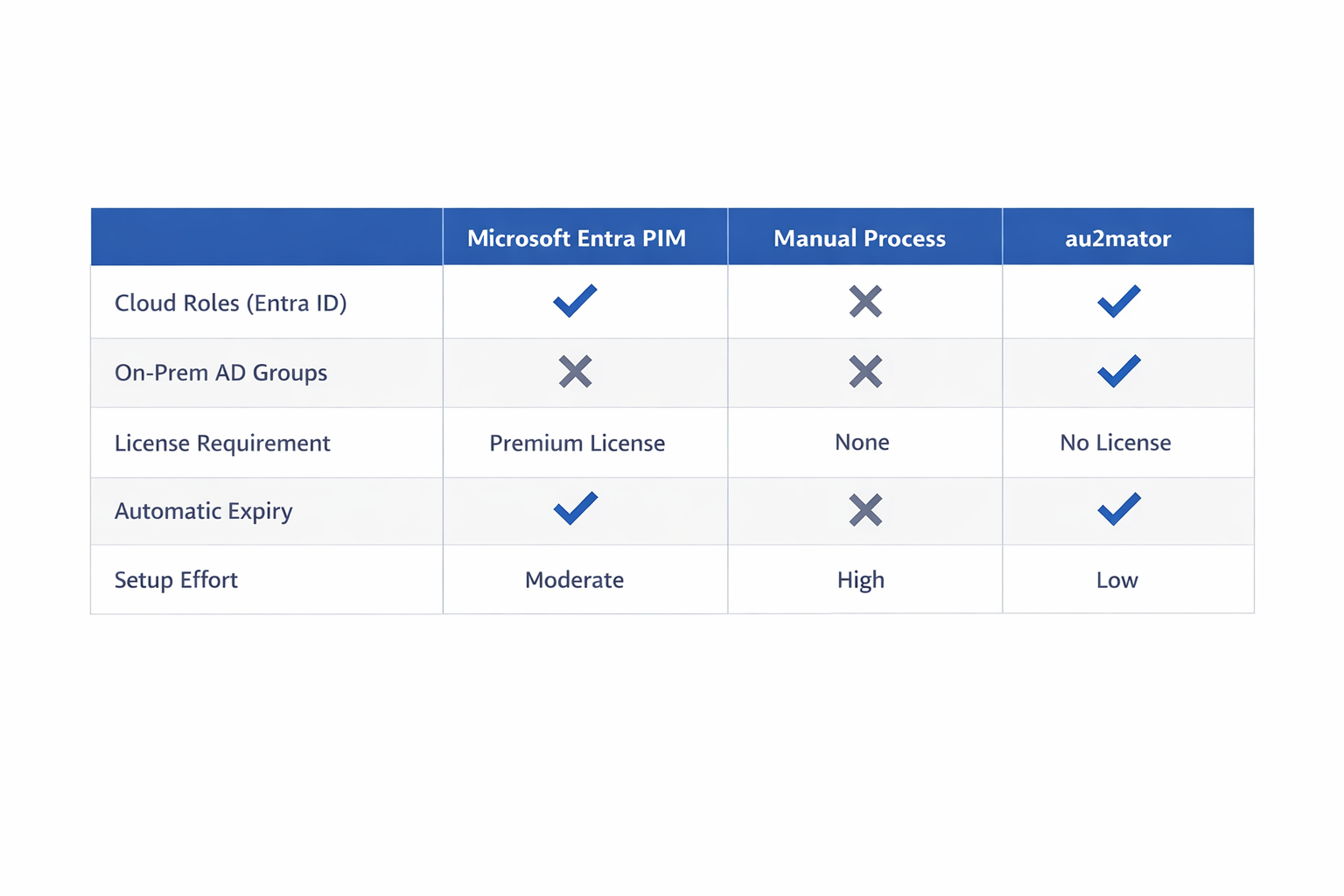
There is a second problem that I think gets overlooked in this discussion: in practice, Entra PIM mostly covers cloud roles, meaning Entra ID roles and Azure resource roles. For classic on-premises Active Directory permissions, say a time-limited membership in a Domain Admin group or a delegated OU admin group, the native tooling does not really reach that far. And that is exactly where a lot of mid-sized companies still live, with a hybrid environment of on-prem AD and Entra ID side by side.
How just-in-time access actually works
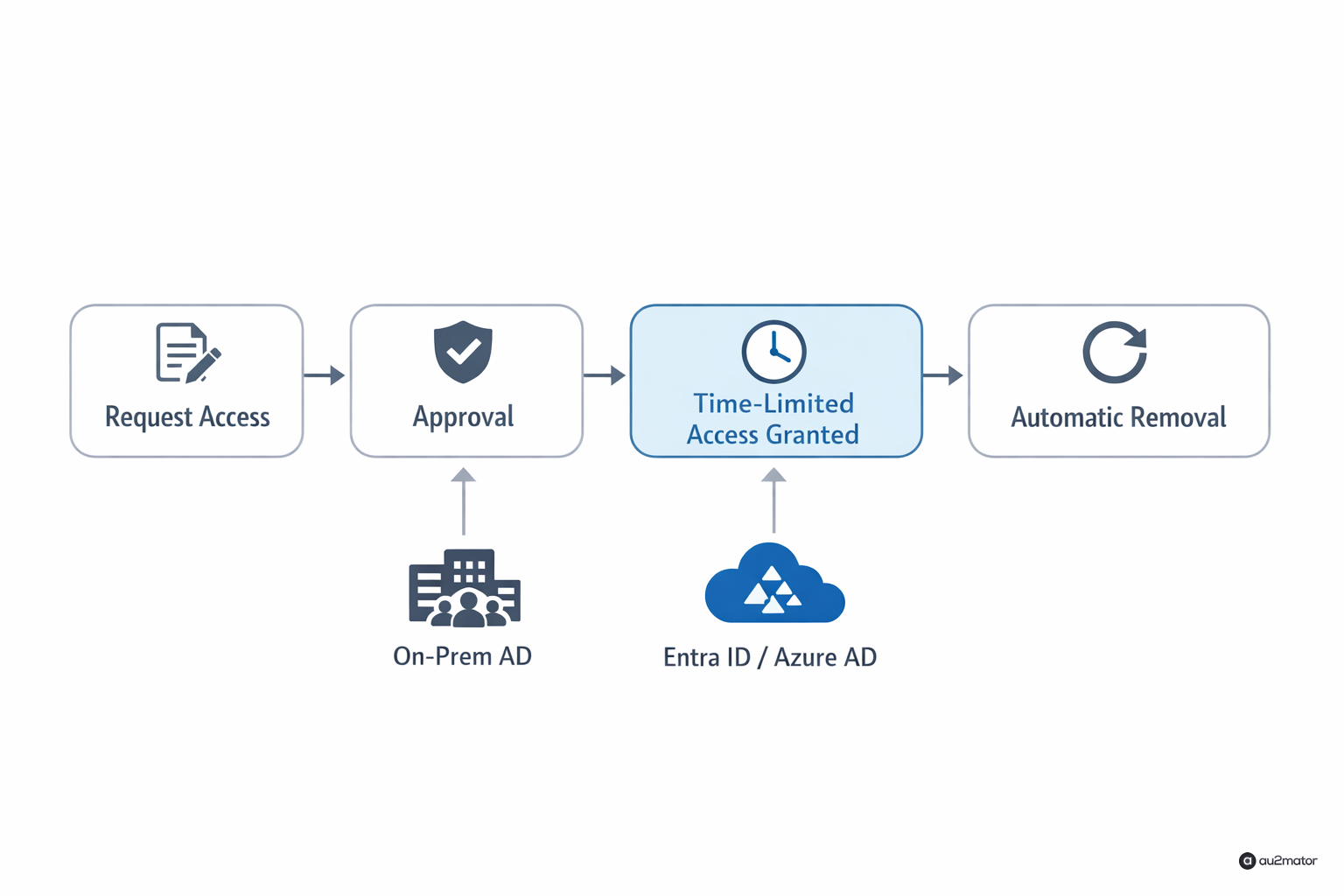
The basic idea behind just-in-time admin access is actually simple, even if the implementation has a few pitfalls. A user who needs a privileged action, say membership in an AD security group, submits a request. That request can be auto-approved if certain criteria are met, or it goes to an approver who confirms it quickly. Once approved, the permission is granted, but with an expiration attached. Once that time runs out, the membership is automatically removed again, without anyone needing to remember to undo it manually.
The part that gets missed most often in practice is exactly that last step: automatic removal. I have seen in several audits that companies had a process for granting time-limited rights, but no reliable automated mechanism to actually take them away again. In the end, the “temporary” permissions just stuck around because nobody put a reminder in the calendar or the person responsible for the ticket was on vacation. At that point, the whole security benefit is gone.

How I approached this at au2mator
When I kept seeing this need across multiple customers, it was clear to me that I did not want to build this as a pure Entra ID add-on, but as something that covers both worlds. In au2mator, this runs through a time-limited group membership model that works against both on-prem Active Directory and Entra ID groups, through the same process. An employee requests a time-limited permission through a simple form, picks the duration, say two hours or until end of day, and gives a short reason. Depending on configuration, that goes through directly or needs sign-off from a defined approver.
The key difference from a manual process built on tickets and good intentions is the technical guarantee at the end: a runbook runs in the background, watches the expiration times, and reliably removes the group membership, whether that is on-prem AD through a local agent or Entra ID directly through the Graph API. That happens regardless of whether someone is in the office, on vacation, or simply forgets. That automation is exactly the point where a nice idea turns into an actual security control you can rely on.
What that means for cost
The practical effect for a lot of customers is that they do not need a company-wide license upgrade just to properly secure a handful of administrative accounts. You can roll the principle out specifically for the people and groups it actually applies to, whether the permission lives in the cloud or on-premises. For companies that are primarily in the Microsoft cloud and already have P2 licenses for other reasons, native Entra PIM is often still the right call for pure cloud roles. But for anyone running a hybrid environment, or who does not want a license upgrade for cost reasons, that is exactly the gap I wanted to close.
What I actually recommend to companies
If you are currently thinking about how to reduce permanent admin rights in your organization, I would start by simply counting. How many accounts currently hold permanent privileged roles, whether in AD or Entra ID, and how often is that access actually used. In most cases I have seen, the answer is sobering: far less often than the permanent grant would suggest. Once that number is on the table, the decision to move to just-in-time access usually becomes obvious on its own, the only remaining question is which tool to use, depending on what your environment looks like and what you already have licensed.
I write regularly about IT automation, Azure, and whatever comes up while building au2mator. If you have questions about your own environment, feel free to reach out.